BalbharatiMaharashtra State Board Class 11 Information Technology SolutionsChapter 3 Impressive Web Designing Textbook Exercise Questions and Answers.
Maharashtra State Board Class 11 Information Technology Solutions Chapter 3 Impressive Web Designing
1. Answer the Following:
Solution & Step-by-Step Answer:
1. Photograph – <Img> 2. Write remarks about the photograph – <TextArea> 3. Underline the heading – <U>
Solution & Step-by-Step Answer:
| |, &&
2. Complete the following Activity:
Solution & Step-by-Step Answer:
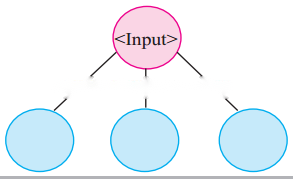
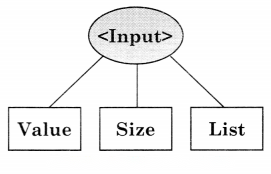
Solution & Step-by-Step Answer:
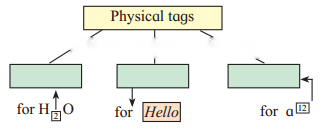
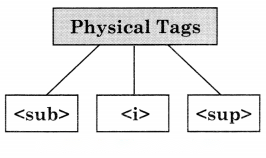
Solution & Step-by-Step Answer:
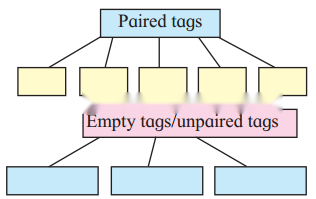
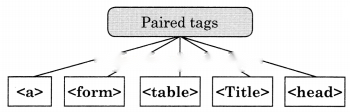
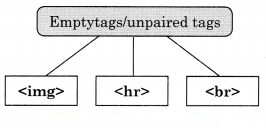
Solution & Step-by-Step Answer:

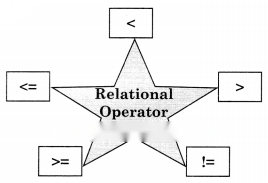
Solution & Step-by-Step Answer:
<!DOCTYPE html> <html> <head><title> Series </title></head> <body> </html>
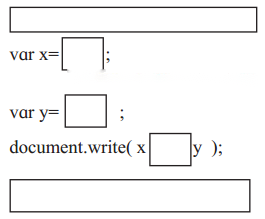
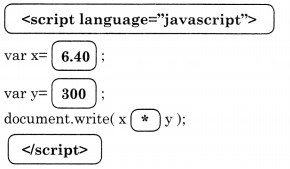
3. Find out errors if any in the following javascript code.
Solution & Step-by-Step Answer:
Concatenate Operator ‘+’ is missing document. write(“Area of triangle is” [+] area);
4. Solve the following puzzles.
Question A.
Fill the blocks
1) Across
2. The tag is used to create a table row.
4. Tag to create a form
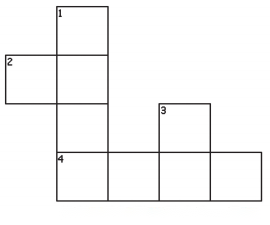
2) Down
1. The attribute is used to specify the path of a linked document.
3. The tag used to display horizontal ruled line
Answer:
Across
2. <tr>
4. <form>
Down
1. href
3. <hr>

Question B.
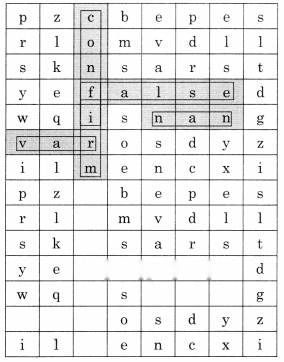
Solve the puzzle by finding words with the help of the hint given below.
1. Boolean value.
2. Keyword used in conditional if statement.
3. Built-In function in JavaScript
4. Function to check given value is number or not
5. Keyword used to declare a variable
6. Function used to evaluate given expression
Answer:
1. False
2. if
3. confirm
4. nan
5. var
6. False
5. Trace the output of the following Html code.
Solution & Step-by-Step Answer:

6. Discuss the following and answer the questions.
Solution & Step-by-Step Answer:
A Junior Web designer will use the following controls to design web as follows: 1. Text – to create a single-line textbox for employee name 2. Text or Textarea – If he wants to create a single-line address the text control is used otherwise to create a multiline address textarea is used. 3. Submit – It is used to submit form data to the server. 4. Reset – It is used to clear form data.
Tags used for the controls are-
1. Employee Name :<Input type-”text”>
2. Address :<Input type=”text”> or
Address: <textarea rows=”4” cols-”30”><textarea>
3. <Input type=”submit” value=”submit”>
4. <Input type-”reset” value=”reset”>
Solution & Step-by-Step Answer:
Program: <!DOCTYPE html> <head> </head> <body> <script language =”Javascript”> //To check whether the given no is between 50 to 100 var n; n=prompt(“Enter any number”); if(n<50 | | n>100) { alert(“it is less than 50, Please Re-Enter”); } else { alert(“it is greater than 50. Please Re-Enter”); } </script> </body> </html>
Variables used ‘n’
Operators used Not is equals | | less then < grater then > etc
Function is Prompt(), Alert() if then Else
7. Create web pages for the following.
Solution & Step-by-Step Answer:
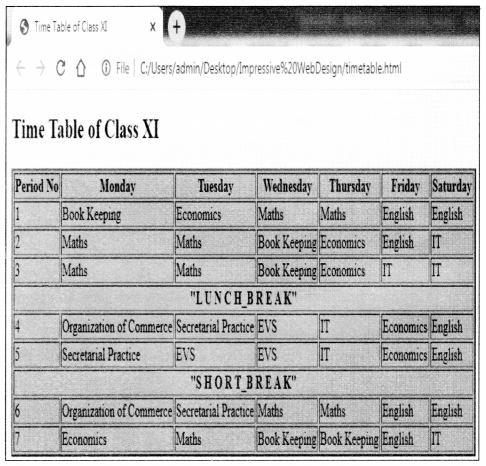
Program <!Doctype Html> <html> <head><title> Time Table of Class XI</title> </head> <body bgcolor=yellow> <h2>Time Table of Class XI</h2> <table border=”2” bgcolor=skyblue> <tr> <th>Period No</th> <th>Monday</th> <th>Tuesday</th> <th>Wednesday</th> <th>Thursday</th> <th>Friday</th> <th>Saturday</th> </tr> <tr> <td>1</td> <td>Book Keeping</td> <td>Economics</td> <td>Maths</td> <td>Maths</td> <td>English</td> <td>English</td> </tr> <tr> <td>2</td> <td>Maths</td> <td>Maths</td> <td>Book Keeping</td> <td>Economics</td> <td>English</td> <td>IT</td> </tr> <tr> <td>3</td> <td>Maths</td> <td>Maths</td> <td>Book Keeping</td> <td>Economics</td> <td>IT</td> <td>IT</td> </tr> <tr> <th colspan=”7”>”L U N C H_B R E A K”</th> </tr> <tr> <td>4</td> <td>Organization of Commerce</td> <td>Secretarial Practice</td> <td>EVS</td> <td>IT</td> <td>Economics</td> <td>English</td> </tr> <tr> <td>5</td> <td>Secretarial Practice</td> <td>EVS</td> <td>EVS</td> <td>IT</td> <td>Economics</td> <td>English</td> <tr> <th colspan=”7”>”S H O R T_B R E A K”</th> </tr> <tr> <td>6</td> <td>Organization of Commerce</td> <td>Secretarial Practice</td> <td>Maths</td> <td>Maths</td> <td>English</td> <td>English</td> </tr> <tr> <td>7</td> <td>Economics</td> <td>Maths</td> <td>Book Keeping</td> <td>Book Keeping</td> <td>English</td> <td>IT</td> </tr> </table> </body> </html>
Solution & Step-by-Step Answer:
Program: <!DOCTYPE html> <head> <title> Form</title> </head> <body bgcolor=”#FF0100”> <h1>Personal Data</h1><br><br><br> Name :<input type=text name=t1><br><br> Address:<Textarea> Address Here </textarea><p><br> Class XI <input type=radio name=c1 value=xi> Class XII <input type=radio name=c1 value=xii><br> <input type=Submit name=b1 value=Submit> <input type=reset name=b2 value=Reset> </body> </html>
Output:

Solution & Step-by-Step Answer:
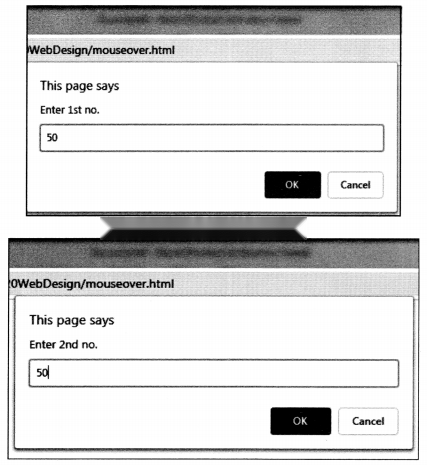
<html> <head> <title> JavaScript Program </title> <script language = “JavaScript”> function iload() { var c=0 a=parseInt(prompt(“Enter 1st no.”)); b=parseInt(prompt(“Enter 2nd no.”)); c=a+b document.write(“Addition is”+c); } </script> </head> <body><center><br><br><br><br><br> <a onMouseover=”iload();”>Addition</a></center> </body> </html>

8. Complete the following.
Solution & Step-by-Step Answer:
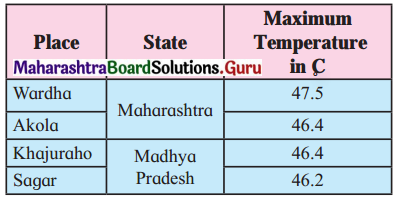
9. Write HTML Code for the following table.
Solution & Step-by-Step Answer:
<!DOCTYPE html> <head> <title>Html Program </title> </head> <BODY> <table border=”1”> <tr bgcolor=pink> <th>Place</th> <th>State</td> <th>Max <br>Temperature <br>in C</th> </tr> <tr align=center bgcolor=skyblue> <td>Wardha</td> <th rowspan=”2”>Maharashtra</th> <td>47.5</td> </tr> <tr align=center bgcolor=skyblue> <td>Akola</td><td>46.4</td> </tr> <tr align=center bgcolor=skyblue> <td>Khajuraho</td> <th rowspan=”2”>Madhya Pradesh</th> <td>46.4</td> </tr> <tr align=center bgcolor=skyblue> <td>Sagar</td><td>46.2</td> </tr> </table> </body> </html>

10. Multiple choice one correct answer.
Solution & Step-by-Step Answer:
(b) Get
Solution & Step-by-Step Answer:
(a) x++